
The Oman archive is a collection of development material for Nintendo 64 hardware and software. It preserves Silicon Graphics (SGI) Project Reality documentation, chip design and simulation files, operating-system source, tools, and demonstration programs. Nintendo and SGI announced their Project Reality partnership in August 1993 1.
The archive records several stages of that work rather than one SDK release. It includes early HeadStart documents, later Ultra 64 installation files, and a separate SN Systems Windows development package. The exact date and original route by which this collection became public are not established by the files in this copy.
History of the Oman Archive
SGI’s 1993 announcement described the Indy workstation as a Project Reality authoring system 1. Within the archive, DOC/README identifies the HeadStart environment as a way to begin software and artwork development while the hardware and software interfaces were still being finalized 2. Source headers in the collection document active work during 1994 and 1995. The INSTD.TAR installation records identify an Ultra 64 development environment labeled 2.0G. These dates describe the material inside the collection, not when it was copied or circulated.
The name “Oman” identifies the circulating archive. This copy contains no verified statement naming the person who first distributed it, and its copied filesystem dates cannot establish that event. Claims that the archive appeared in a particular month or caused a particular advance in N64 emulation therefore need independent contemporary evidence.
Many source modules carry SGI proprietary notices. The viewer below publishes names, sizes, descriptions, and checksums to document the collection without reproducing its source code. The later Gigaleak is a separate collection; its appearance does not date or authenticate this archive.
What is in this copy?
The archive combines hardware design, simulation, developer-facing material, and SDK support code. This breakdown counts files in the extracted copy indexed below:
| Area | Files | What it shows |
|---|---|---|
HW and HW2 |
3,214 | Verilog modules, synthesis scripts, and physical design work for the Reality Coprocessor. |
APPS |
2,123 | Demos, application-level verification programs, performance tests, and their assets. |
RDPSIM and RDPSIM2 |
2,077 | Reality Display Processor simulator code, inputs, and expected or captured test output. |
usr |
1,670 | An IRIX-style SDK tree with headers, source, examples, and installed files. |
RSPSIM |
1,200 | Reality Signal Processor simulator source and instruction regression tests. |
DOC |
238 | HeadStart notes, FrameMaker documents, PostScript output, and sample images. |
| Other areas | 1,967 | Microcode, libraries, manual pages, host tools, assemblers, and root-level packages. |
The file count describes this extraction, including duplicate or compiled build products. A file’s presence shows what survived in the collection, not whether every Nintendo 64 developer received it.
Browse the Oman archive
The archive viewer indexes 12,489 files in 1,048 folders from an extracted copy of oman. Select a folder for a summary of its contents, or select a file for its format, purpose where established, byte size, and MD5 checksum. The descriptions draw on file headers, source declarations, document text, and the surrounding directory structure. Entries based partly on a filename say so in their description basis.
Loading archive index...
The viewer contains metadata only. The checksums identify the files in this particular extracted copy; they do not authenticate the original leaked archive or establish the files’ creation dates.
Top Level files
Like most leaks there are a bunch of misc files at the root of the archive that are not always particularly relevant. This section will try to categorised them as best we can.
SN64 SDK Files
These documents are all from February 1997 and really should have been in a folder called N64Win95 or Sn64 as they all come from the same product, maybe it was a copy error by the original author of the leak.
They are from a development kit by SN Systems known as SN64 and this was the Windows 95 version of the SDK. SN64 is just the brand name of the Nintendo 64 versions of SN Systems PSYQ development kit that also supported Playstation and Saturn consoles.
This made it a really popular choice for 3rd party game developers as it was slightly easier to port code between the consoles using the SDK.
All of the files in the root directory up to and including N64NOTES.TXT (9th March 1997) are from this SN64 SDK. The other top level files are listed separately below.
tmp file
Although the file simple called tmp looks like a linux directory it is in fact an ASCII Text file that is the output of running a directory command on their E:\oman\DOC folder.
AUD.c
A C-source file that must have been misplaced, not sure exactly where it came from but it was created by SGI in 1994. The same file exists in TOOLS\EMULATE\AUD.C so it must have been copied by accident to the top level directory.
docs.zip
This contains a subset of the files from the /DOC folder and they are all identical in contents to those files too. This zip can be ignored and you can go straight to the /DOC folder.
INSTD.tar
This TAR archive contains the N64 SDK version 2.0G (for RCP 2.0) for use on an IRIX Unix machine, to install just copy the 2 folders (var and usr) to the root of your SGI IRIX.
Also note that these files also exist extracted in the root directory of the main tar file.
usr folder
The files in this tar are part of the standard N64 SDK so will not be covered here as they have been covered multiple times elsewhere.
tmp folder
The tmp folder is blank and contains no data, it should not have been included in the archive.
var/inst folder
IRIX machines comes with a command called inst used for installing software distributed by SGI 3.
The program saves the details of everything that has been installed in the /var/inst folder, and so the SDK comes with a few files used by the inst program when listing what is installed:
| Name | Description |
|---|---|
| rsp_dev | Install record for Nintendo 64 RSP Development Environment 2.0G |
| ultra | Install record for Ultra 64 Development Environment, 2.0G |
| rsp_audio | Install record for Nintendo 64 RSP Audio Microcode Source Code 2.0G |
| gng_noship | Install record for Ultra 64 Noship Go/No-go Test Software 2.0G |
| rsp_gfx | Install record for Nintendo 64 RSP Graphics Microcode Source Code 2.0G |
| hist | History file for IRIX inst command |
| .rqsfiles | standard file on all IRIX machines that have inst command |
| orphan | standard file on all IRIX machines that have inst command |
| .machine_inventory | Holds metadata about the current machine |
| INSTLOG | Log file from the last time the inst command ran |
var/sysgen/master.d folder
The folder var/sysgen/master.d on an IRIX system is used by the lboot command to define the master files for the bootable kernel. In this case it just contains one file called u64 for the N64 hardware.
Master files are basically configuration for all the modules on an IRIX system and can be viewed using the master command 4.
AS Folder (Algorithm Simulator)
The folder called AS is at the top level and contains a brief README saying that this folder contains a C program that begins to model the algorithms and functionality of the MSP and MDP (presumably the RSP and RDP).
The Algorithm Simulator was used before the N64 hardware prototype was available to develop on and allowed developers to get a head start on their games.
The folder contains:
- *.c C source code
- *.h C header files
- *.o compiled version of the *.c files
- *.RGB - Textures
- *.I - 3D object files
APPS Folder (Demos and Verification)
APPS is the largest single directory in this copy. It combines demonstrations of graphics and operating-system features with programs written to test particular parts of the hardware. The distinction matters: a test application may deliberately produce unusual pixels or command streams rather than a playable scene.
RDPATT as an application-level test
The APPS/RDPATT/README calls this an RDP application-level verification suite. Its MAIN.C describes a sequence of single-frame tests. The common frame loop lives beside test-specific display lists in STATIC.C and procedures in RDPVERIF.C. This arrangement lets a developer change one rendering case while keeping the harness stable.
The project also carries tiny SGI-format textures. These two 32 x 32 source images are the archived APPS/RDPATT/TEXTURE/COLORBAR.RGB and GRID.RGBA, enlarged with nearest-neighbor display so their pixels remain visible:

Converted from APPS/RDPATT/TEXTURE/COLORBAR.RGB in the archive. The narrow color bands make changes in texture sampling visible.

Converted from APPS/RDPATT/TEXTURE/GRID.RGBA. Its straight lines and alpha channel give the tests another distinct input.
Other APPS projects exercise audio, controller input, microcode, rendering modes, and performance. The viewer supplies their individual file records; RDPATT shows how application code, display lists, and small assets fit together in one test project.
Many of the application folders also survive in the Project Reality development tree beside Turok’s game source. The N64 SDK demo guide compares complete-file checksums and explains the lessons in the shared samples.
COSIM Folder (Co-Simulation)
The Cosim folder contains C and Assembly source code used to test the hardware including testing the early Verilog model for “Project Reality”.
Co-Simulation is using software to verify and test simulated hardware, in this case it is testing the N64 development hardware with a few basic software tests 5.
DOC Folder (Documentation)
The DOC tree records SGI’s HeadStart development environment. Its README says the aim was to introduce the system and let developers begin software, animation, and artwork work while interfaces were still changing 2. It also warns that emulator performance would not exactly match hardware and that the environment did not yet include audio and video software components. Those limits are part of the document’s historical value: they show what SGI expected early developers to build and what was still provisional.
Follow the design from overview to implementation
The most useful documents form a route through the graphics system. Their names and roles come from the archive’s own DOC/README and the surviving readable files:
| File | What it explains |
|---|---|
DOC/README |
HeadStart’s goals, documentation map, and explicit limits of the early environment. |
DOC/SWARCH.PS |
A PostScript copy of the software-architecture notes identified by the README as an overview of design decisions and tradeoffs. |
DOC/LOGICAL_RDP.FM |
The logical state machine for the RDP rendering pipeline, as described in the README. |
DOC/RDP_COMMANDS.FM |
RDP commands and the relationship between programmable operations and emulator support. |
DOC/GFXBI.FM |
Graphics Binary Interface commands sent toward the RSP geometry stage. |
DOC/BLEND_MODES.TXT |
Readable detail on blender input selection, antialiasing, and rendering modes. |
DOC/VIDEO_MODES.TXT |
Readable detail on video-interface filtering, sync generation, and display modes. |
This sequence links the software interface to the hardware it controls. The README also points out that not every feature had a matching emulator implementation or manual page, so an absent page is not proof that the eventual console lacked the feature.
What the blender and video-interface notes reveal
BLEND_MODES.TXT, attributed in its header to Phil Gossett and dated 14 May 1995, describes the blender’s selectable inputs for pixel, memory, blend, and fog color. Its central equation is color = (a*p + b*m) / (a + b). The note goes on to explain how a sync command keeps earlier primitives from using register values that have already been changed. The document is useful because it relates a visible rendering result to register choices and pipeline ordering rather than merely listing bit fields.
VIDEO_MODES.TXT, dated 27 June 1995, describes the video interface as the second pass of an antialiased z-buffer approach. It distinguishes texture filtering, coverage of polygon fragments, and silhouette blending, then discusses NTSC and PAL timing and video modes. Read together, the two notes show why an RDP test needs both pixel inputs and the state that determines how those pixels are combined.
Document formats and image material
The DOC tree mixes text, PostScript, and binary Adobe FrameMaker files. The .FM files inspected here begin with <MakerFile 3.0F> and many .DOC files begin with <MakerFile 4.0K>; those .DOC files are not Microsoft Word documents. AUDUCODE.PS, MPEG_TALK.PS, and SWARCH.PS are separate PostScript output. The archive viewer identifies each format and marks topics inferred from filenames.
The PICS directory contains source images as well as documents. The following are faithful WebP conversions of two archived files, not reconstructed screenshots of a running Nintendo 64 game:
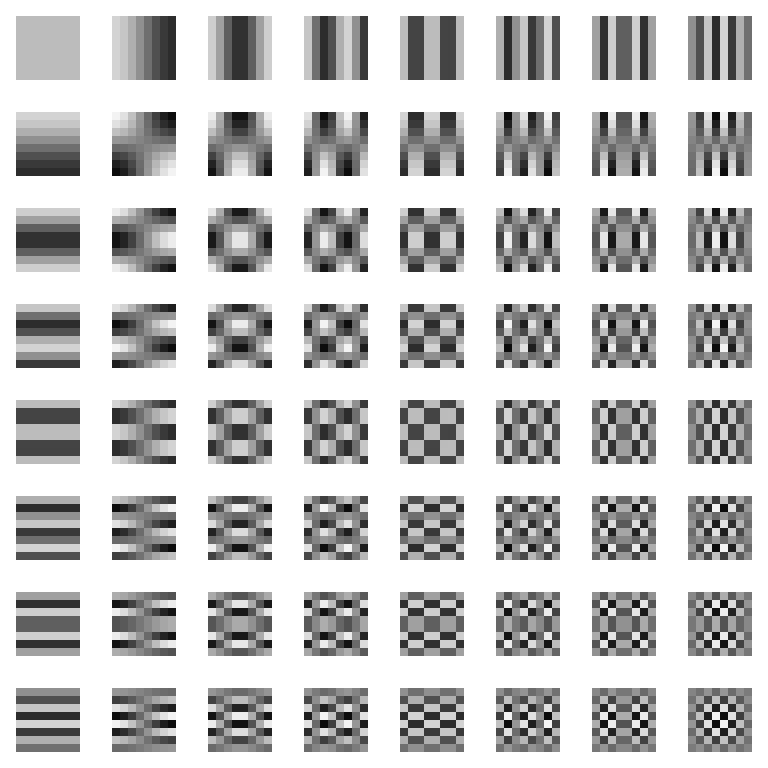
Source: DOC/PICS/PIC8.SGI, an SGI image in the archive. Its repeated gradients and grids are useful for seeing sampling and filtering differences; the archive does not state the exact test that used it.
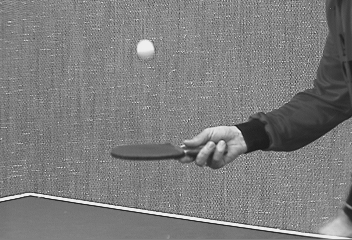
Source: DOC/PICS/TENNIS1.CIF, an SGI image in the archive. A photographic scene offers different edges and tones from the geometric pattern sheet; its exact use is not documented here.
The subdirectories divide the documentation by subject, while the viewer retains the full file inventory:
| Directory | Subject |
|---|---|
DOC/HW and DOC/VERIF |
Hardware specifications and verification plans. |
DOC/DEV |
Developer-facing programming-manual chapters, templates, and scripts. |
DOC/RSP |
RSP architecture, instruction, and assembler documentation. |
DOC/4300 |
NEC VR4300 CPU material, including cache, execution, and interface chapters. |
DOC/MSP_EXAMPLE |
Pseudocode examples for geometry functions and performance estimates. |
DOC/PICS |
SGI-format image inputs and examples. |
HW & HW2 Folders (Hardware Verilog Models)
Verilog is a Hardware Description Language used to Design and verify hardware. The HW and HW2 folders contain Verilog source code for the Nintendo 64 hardware, including the prototype development boards.
HW.old contains version 1.0 of the RCP Verilog source code presumably for archival reasons.

Texture filtering from design to test
HW/CHIP/RCP/TF/SRC/TF_LERP.V defines the tf_lerp Verilog module. Its header identifies it as a triangular bilinear interpolation stage for the texture filter and names Phil Gossett as designer. Two Booth-encoded multiplier paths feed a carry-save adder in the module body. This gives a concrete hardware counterpart to the filtering behavior discussed in DOC/VIDEO_MODES.TXT.
The neighboring RDPSIM/TEST/TF tree shows how the texture-filter block was exercised. INDATA/INP000.C labels its first case a quick check and emits named signals such as bilerp0m, sfrac_rg, and texel color inputs. DRIVER.C reads tabular inputs and drives wire values each clock. Compressed files under OUTDATA/TF_ALL preserve test output. Together, these files document an input-to-RTL-to-output verification path; they do not by themselves prove which hardware revision shipped in a retail console.
INCLUDE Folder
This folder contains header files that are distributed with the official N64 SDK to developers plus some additional headers used for internal tools.
Files unique to this directory and not in the SDK are as follows:
- AudioTools.h
- DbgDefs.h
- DbgProto.h
- DriverD.h
- Em.h
- RSP_IPC.h
- TaskOff.C
- Trace.h
- Ultra64.h
- UltraHost.h
- verify.h
IOSIM Folder (Input Output Simulation)
This folder contains code for Input/Output simulation for the Verilog models of the N64 hardware.
This seems to be mainly used for testing the prototype N64 hardware while still in development.
KERN Folder
This folder contains the source code for the N64 development board kernel so that it can be used from the Indy workstation.
This consists of the following folders:
- INSTALL - source for
prinstallwhich installs the SDK - MASTER.D - Boot information for n64 development hardware board
- SYS - Header files for device driver
- U64 - Device driver source code for /dev/u64
LIB Folder
This folder contains the source code for a variety of different libraries that are not distributed to developers.
- BRINGUPBOOT - contains code for
Bootandpif2Boot, along with IPL4 code - LIBAUDIO.SKIP - Old version of the Audio code found in libUltra
- LIBMPAUDIO - MPEG Audio library (only 2 files)
- LIBULTRAHOST - Code for functions such as
uhOpenGamewhich communicate with the N64 development hardware - ERROR - Seems to be a list of supported Error messages used in libUltra
- LIBIMAGE - converts
libimage.atolibimage.so - LIBRCPPLI - Code for
librcppli- unknown purpose - LIBVID - Huf Mpeg Video Library
LIBULTRA Folder
LibUltra is the official Nintendo 64 development library sent out to all developers in compiled form as part of the official SDK. This folder contains the actual source code for this library.
The source code is split into a number of folders based on the specific task:
- AUDIO - all the Audio functions that start with
alin the library - GT - Turbo Graphics Utility functions such as
gtDumpTurbo - GU - all the Graphics functions that start with
gusuch asguLookAtF - IO - Input/Output functions that normally start with
ossuch asosContReset - LIBC - Standard C library functions such as
sprintf - LIBULTRA - Config for creating retail hardware version of libUltra
- LIBULTRA_D - Config for creating retail hardware version of libUltra with debugging
- LIBULTRA_EM - Config for creating emulator version of libUltra
- LIBULTRA_I - Config for creating Indy Workstation version of libUltra
- LIBULTRA_ROM - Config for creating retail
libultra_rom.alibrary - LOG - Debug Functions for logging such as
osCreatelog - OS - Main operating system functions such as
osInitialize - RG - Memory region functions such as
osMalloc - RMON - Reality Monitor functions such as
osMalloc - SCHED - Scheduler functions such as
osCreateScheduler - SP - Sprite Library functions such as
spMove
Man Folder (Manual Pages)
This folder contains all the Manual pages (known as man pages in unix) for the entire N64 development kit.
If you ever wonder what a specific tool or function was used for in N64 development then this is the best place to search.
During install of the development kit, two versions were created of these files, one in the standard man page location and the other in PostScript file format intended for physically printing out at /usr/src/PR/doc/ps.
RDPSIM & RDPSIM2 Folders (Reality Display Processor Simulation)
These folders contain two different versions of the Reality Display Processor Simulator. One for RCP 1.0 and the other for RCP 2.0.
This was used to help software developers start coding their games while the hardware was still being developed and also as a way to test the hardware while it was being created.
RSPASM & RSPASM1201 Folders (Reality Signal Processor Assembler)
This folder contains the source code for the Assembler used to compile *.S assembly files into RSP microcode (uCode).
To do this they have created a yacc parser grammar file called PARSER.G.Y and a Lexer called PARSER.LX.L. Also included are a few AWK scripts to help the assembler with tasks such as wrapping the file in C code etc.
This is a fairly standard way to create an assembler or compiler and it doesn’t take very long to understand the YACC grammar syntax and you can understand how it works.
The RSPASM1201 is just a previous version of the RSPASM folder from the 1st of December (12/01) used for regression testing of the RSP.
RSPCODE Folder (RSP uCode microcode)
This folder contains RSP source code (known as uCode or microcode) for performing a bunch of tasks on the RSP (Reality Signal Processor) chip.
These include:
- AUDIO - playing Sounds and Music using the RSP
- GRAPHICS - Graphics calculations such as Lighting etc
- MANTEST - Manufacturing Test Vectors microcode
- MPAUDIO.DELETED - MPEG audio microcode (deprecated)
- MPVIDEO.DELETED - MPEG video microcode (deprecated)
- RSPBOOT - The Boot (Startup) code for the RSP
- VIDEO - MPEG video microcode
- grfx_ucode_src.zip - compressed version of the
GRAPHICSfolder
All the source code requires RSPASM to assemble into object files and then RSP2ELF to convert into an executable file format.
RSPSIM Folder (Reality Signal Processor Simulation)
This folder contains the source code for a full simulator (emulator) of the RSP (Reality Signal Processor). This was created to allow developers to start writing RSP scripts while the hardware was still being developed.
There are a few executables that this source code builds which are:
- rsp - main simulation executable (CLI version)
- rspg - main simulation executable (GUI version)
- rsp_ops - utility to dump the disassembly of the command set
These tools helped 1st party developers (and a few lucky third parties) write and debug their RSP microcode on their workstation without constantly testing on the hardware.
TOOLS Folder
The Tools folder contains the source code of many of the tools distributed in the Nintendo 64 SDK.
There is a Makefile in this directory that can be used to build all of the tools at once.
COMPUTILS
The CompUtils folder contains code for a bunch of compiler tools such as nld, gdis, gnm and r4300_check.
CONTROLLER
The Controller folder contains example C code for a Unix (IRIX) program that can access a game controller. Probably useful for testing code before the N64 hardware was ready by connecting a controller directly to the IRIX workstation.
CONV - multigen database conversion tools
Multigen was a tool for creating 3D models and environments on SGI IRIX workstations and so was ideal for creating 3D graphics for the N64.
In fact Nintendo had its own fork of the project specifically for the Nintendo 64 called Ningen.
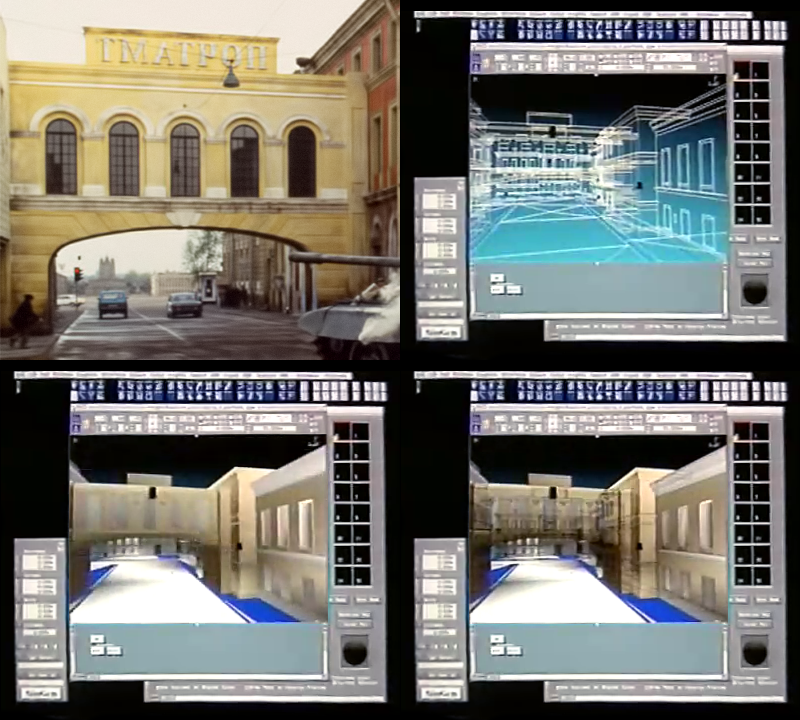
The CONV project is source code for a series of tools to convert Multigen models and textures to a format that can be run on the N64. These tools include:
- flt2c - Convert 3D models in FLT format to C code
- rgb2c - convert RGB textures to C code
- ppmquant - reduce colours in pixmap
- imscale - RGB image scale tool
DATA - Verilog data tools
Not sure exactly what these tools are for but something to do with manipulating .data scripts for Verilog.
Tools included I n this package are:
- checkaudio - extracts and verifies audio from Verilog log file
- checkhex
- checkimage - extracts and verifies image from Verilog log file
- checkvideo - extracts image from
vi.taband compare to rgb file - data2rdram
- rdram2data
- rdram2image
- rdramgclr
- bump - creates bump map?
- dump2mem
- gbi2mem
There seems to be a few tools from converting rdram to data and back but it is not clear what the purpose of this would be.
DLPRINT - Print DisplayLists
This folder is the course code for a tool called dlprint that basically sits in a loop waiting for Display Lists to be passed to it and it will print them to the console, very useful for debugging.
So how exactly do we pass display lists to the tool? Well it seems to use a macro defined in u64gio.h called DEV_U64_DATA for this purpose and is set to the path: /dev/u64_data.
Notice that this is a UNIX device (in /dev folder) so it is used to communicate with the N64 development board that was inside the workstation.
It calls a function called uhOpenGame which is defined in the LIBULTRAHOST project in the file OPENGAME.C. It returns a file descriptor if it succeeds.
DRIVERD - Driver Daemon startup utility
This folder contains the source code for a program called driverd which is used to setup the N64 emulation hardware. This program is a daemon so it runs in the background and should only ever be running one instance at any given time.
It provides functionality to send commands to running games and read responses. You can use this functionality by using the IRIX device driver for u64. See the dlprint source code above for example code utilising this driver daemon.
EMULATE - N64 Emulator by SGI
This folder contains the source code for the emulate executable and the library libem.a. The emulate tool takes in a rom image and a bunch of parameters whether to enable lighting and openGL.
This tool is used as a High Level emulator running on the IRIX workstation and forks a process of each of the RSP and RDP simulators to handle the additional chips.
GLOAD - Game Loader
This folder contains the source code for the command gload which is use for loading a ROM into the N64 development board inside the IRIX workstation. Unlike the emulate tool this actually runs the game on real N64 hardware.
GPERF - Game Performance Profiler
The source code for the gperf tool is in this folder, the tool is used to help game developers optimise their code by profiling how much time is spent in each function.
MAKEROM
This folder contains the source code for the makerom utility which converts a specfile into a ROM image that can be run on the hardware and also an ELF executable that can be run in the debugger (GVD).
KDEBUG - Kernel Debugger
This folder contains the source code for the Kernel Debugger known as kdebug, this tool was used to send debugging information to and from the N64 development kit hardware inside the IRIX workstation. It used the /dev/u64_kdebug device driver for the communication.
GCORD - Code Re-order tool
This folder contains source code for two versions of a tool called gcord, which is similar to the Unix command cord. The purpose is to optimise the game code to fit into the machines cache more efficiently.
usr and var folders
These 2 folders are just extracted versions from the INSTD.tar file at the root of the project, please see the section on that topic for more information.
Glossary of Terms
There are a few terms used in the Oman archive that you may not be familiar with, here we try to list the most common ones.
MSP - Media Display Processor
MSP or Media Display Processor is a term thought up by SGI for their co-processor that purely handles graphic data. You probably know this for its later name as it became the Reality Display Processor when it became part of Project Reality (i.e the N64).
MBI - Media Binary Interface
The Media Binary interface is just a term that refers to the software interface for interacting with the Reality Co-Processor.
ASIC - Application-specific integrated circuit
Used in some of the hardware documentation to discuss the Chips created to excel at a single purpose.
References
-
Silicon Graphics and Nintendo announce Project Reality, SGI announcement reproduced by IRIX Network; contemporaneous report dated 23 August 1993. ↩ ↩2
-
Oman archive,
DOC/README, “Project Reality HeadStart Development Documentation”. ↩ ↩2