
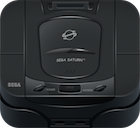
The Sega Saturn has multiple ways to persist game data across play throughs. This includes built in memory on the Saturn console itself and official and 3rd party cartridges that acted as memory cards.
Note that these are not the same as “Save States” that emulators produce as these are specifically written by the game developers to store certain data such as High scores or progress but Save States store the entire console memory.
Saturn Save Data Storage Options
Internal Saturn Memory
Since the Sega Saturn was CD-based it was not possible to add additional hardware to a specific game such as battery backed save files as was common on the Sega Mega Drive.
Instead the Sega Saturn was one of the first consoles to have built in storage for game saves, although it was rather small at 32KB, it means that users didn’t need to buy an external memory card if they just played a few games.
External Cartridge Memory
Similar to other consoles such as the Nintendo 64 and Playstation, it was possible to buy official memory cards known as “Power Memory” from Sega which offered additional space for games to save their state.
These cartridges fit into the standard Saturn cartridge slot and offered up to 512KB of space for game saves!
Third party manufacturers such as Blaze and Datel also started to create their own save cartridges that could store as much as 1MB of game saves.
Third parties also bundles additional features in these cartridges such as Cheat Engines (Action Replay) and region unlocking.

Saturn Floppy Drive
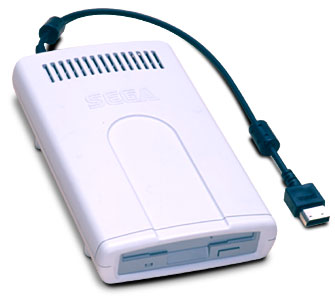
If you have a Japanese console there is a third alternative to the above two options, the Saturn Floppy Drive!
It supports up to 1.44MB of game save data which is many times more than the official cartridge memory and certainly more than the internal console RAM.
Unfortunately however, very few games supported the peripheral which limited its appeal.
Optical Disk Emulators (ODEs)
A number of Sega Saturn ODEs allow for the backing up of save game data to SD card. This includes the Fenrir, MODE, and Satiator ODEs.
Netlink
The Sega Saturn Netlink is a 28.8k modem that plugs into the cartridge port of the Saturn. It allowed for the ability to e-mail game saves.
The save system a Saturn game had to build
The console supplied backup RAM and a Save Data Control screen, but the game still had to handle the player’s first save, a full device, and a cartridge being inserted or removed. Sega’s Backup System Production Standard describes these as application responsibilities rather than features to leave entirely to the boot ROM 1.
Before entering the main game, the application was to check whether its available base RAM and cartridge RAM were initialized. If a device needed formatting, it had to explain the situation and either initialize it through the backup-RAM BIOS or direct the player to the console’s Save Data Control screen. The standard also called for a free-space check before attempting to create a record. A missing save should disable or skip “Continue” instead of leading to a failed load 1.
The distinction between internal and cartridge RAM mattered in the interface. The standard supplied consistent names for the devices, save records, free space, and operations such as copy and erase. It expected games to support both backup destinations when the cartridge was available. Sega specified that one record must not exceed 256 KiB because the boot ROM’s Save Data Control screen could not copy a larger record. The document also says that if a game nevertheless creates a larger record, the application itself must provide the copy function 1.
The same standard describes an 11-character record name: uppercase letters, numbers, and underscores, with no number in the first position. Short names were padded with underscores. Those rules give a reverse engineer something concrete to look for when identifying save-name construction in an executable 1.
Changing discs without losing progress
For a multi-disc game, backup RAM also acted as the hand-off between discs. Sega’s 1997 software standards required the game to save state immediately before the disc change, whether it normally used autosave or let players save manually. If there was not enough room to hold the transition state, disc 2 might be unreachable; the standards therefore specified a warning before the player began disc 1 2.
The same document recommended placing a transition marker in the save record. Disc 2 could recognize that marker and resume the story without making the player navigate the title and save-selection screens first. That recommendation turns an apparently simple “insert disc 2” prompt into a small protocol between two executables 2.

Flow reconstructed from Sega’s multi-disc development standards, chapter 10.
Backing up and Recovering Saves
One problem with Sega Saturn Save Data storage was that not all games supported saving to memory cartridges and management of the saves such as deletion and duplication was not easy.
Thankfully developers have created a few useful Homebrew tools to help manage game save data on the Sega Saturn. These are split into two different categories:
- Copy Saves from Saturn to PC - useful for backing up your game data and sharing your own game saves
- Copy Saves from PC to Saturn - useful for restoring your game data and loading other peoples game saves
Copy Saves from Saturn to PC
Your own game saves stored on the internal Saturn RAM or on external Saturn cartridges will not last forever, so backing up to PC is vital to preserve any data you are specifically proud of or just nostalgic over.
There are a couple of tools which provide this functionality but for both you will need a Saturn capable of supporting Homebrew code.
Save Game Extractor
One difficulty that springs to mind when trying to get save data from the Saturn is how is it possible?
The Saturn doesn’t have the ability to write to a CD-R or external HD, so the solution isn’t obvious. Also most peripherals use the cartridge slot itself, meaning that you wouldn’t be able to dump cartridge-based save data.
This is where one clever solution comes in, transfer the data directly from the SATURN TO PC via sound! All you need is a Stereo audio Y cable adapter and a CDR.

It is based on the minimodem project, which is a very clever tool to send data over audio, it isn’t the fastest method of transfer but it is very effective for use cases such as this 3.
Sega Saturn Save Parser
Once you have the save data copied over from the Saturn to your PC you may want to edit the data. The Sega Saturn Save Parser provides a GUI for exactly that purpose, it can load in a number of formats:
- Power Memory data
- Internal RAM raw image
- Datel Compressed Saves
This tool has the ability to delete, extract and insert saves back into the raw image 4.
Copy Saves from PC to Saturn
Whether you want to restore your own save game data, try other peoples or even experiment with hacked saves you will need a tool to move the saves from your PC to the console.
Thankfully a few developers have created some tools exactly for this job.
Save Data Manager
Save Data Manager by cafe-alpha is the most advanced tool of its type for the Sega Saturn. It’s compatible with all standard memory devices and supports all of the features found in the stock memory manager, with the added benefit of being able to perform operations in bulk (e.g. delete multiple save files at once). It also boasts compatibility with Action Replay cartridges and Fenrir/Satiator ODEs for save data import and export, supports a plethora of save data formats, can dump the system BIOS and cartridge ROM, and includes a firmware flasher utility for use with many different cartridges. It even allows you to establish a link between Saturn and PC with the use of a cartridge featuring DB25 connector, USB DataLink/Bluetooth DataLink (or even antique Comms Link ISA card) and SatLink software.
Note regarding compatibility with Action Replay, Gameshark, and other equivalent cartridges; save data can be exported from cartridge ROM to supported ODEs, but it’s currently not possible to import save data to cartridge ROM.
SaveRepack
SaveRepack by cafe-alpha is a Windows application that allows you to inject save files into the Save Data Manager utility described above. Thanks to this, it’s possible to copy save data from PC to Saturn without the use of expensive hardware; all that’s needed is blank CD-R media, a disc drive for burning the ISO file generated by SaveRepack, and a method of running CD-R discs (Pseudo Saturn cartridge, modchip, or swap trick).
Save Game Copier
Save Game Copier is a tool that allows the user copy Sega Saturn save game files to and/or from internal memory, cartridge memory, external devices (e.g. Sega Saturn Floppy Disk Drive), Satiator ODE, MODE, and CD. It consists of a Sega Saturn homebrew application with a simple text menu.

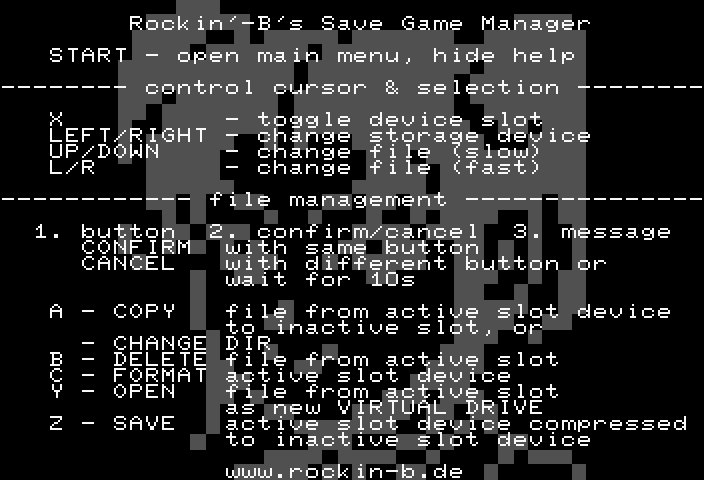
Save Game Manager
Save Game Manager by Rockin'-B is a very useful tool that allows you to manage save games on the Saturn itself. You can copy save games from the burned CD and save it into the internal RAM or the external cartridge RAM, and you can even export save files as base64 strings. It can also dump and update Action Replay firmware 5.
Due to its age, it has less features than its more contemporary counterparts discussed above.
.BUP File Format
A number of Sega Saturn homebrew applications have standardized on the .BUP file header. The 64-byte header contains the metadata of the raw save followed by the save itself.
References
-
Sega, Backup System Production Standard, October 1994, sections on initialization, free space, terminology, and records larger than 256 KiB. ↩ ↩2 ↩3 ↩4
-
Sega of America, Sega Saturn Software Development Standards, version 2.0, February 1997, chapter 10, especially pp. 63-64 on multi-disc saving and transition data. ↩ ↩2
-
GitHub - slinga-homebrew/Save-Game-Extractor: Transmit Sega Saturn save game files as audio. Based on minimodem ↩
-
GitHub - hitomi2500/ss-save-parser: Parser for Sega Saturn images of various save media. ↩