
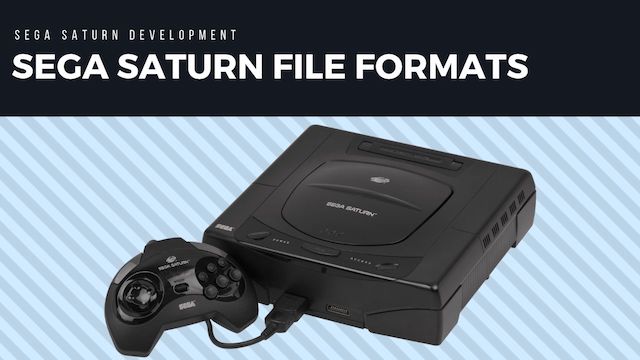
The Sega Saturn was the second released Sega console which used CD-ROM to distribute its games, one of the benefits of the CD-ROM format is many times more space than a cartridge. One of the downsides compared to cartridges however was the slower loading times as reading from a CD is much slower than reading from a ROM chip.
Unlike most cartridge based ROM chips CDs have a standard File System to read files from and so instead of everything being in a giant blob of binary and burned to a chip, the game could be split into multiple files.
Also the consoles would not have enough RAM to hold all the game assets so games would have to stream assets into memory when needed. So it would only read the texture or sound files used in a particular level and ignore the rest.
This makes it slightly easier to do some basic modding of Saturn assets compared to a ROM based console such as the Mega Drive, as you can normally pinpoint the asset you want down to a particular file and sometimes they have file extensions that tell you exactly what format the file is.
Executable Code Formats
Executables (COF)
Sega Saturn Executables are actually COF/COFF (Common Object File Format) files which is a precursor to the ELF executable format that is used on most future console platforms.
ABS files
ABS files seem to be the output of the LNK command and are specified in .lnk makefiles. Each sample in the SDK builds an ABS file along with the COFF executable. They both seem to be a collection of object libraries (assembled code) but not sure the difference between the formats.
Sometimes these are listed as “Execution files” so I am not sure if cof is the default executable format or not anymore.
ABS Files are listed in the documentation as “Absolute load module file “
Disc programs (BIN and PRG)
The file a Saturn loader copies into work RAM is a raw SH-2 image. On disc the names look like 0.BIN, 1ST_READ.PRG, or a sampler program such as 00MENU.BIN.
Two layouts show up in those images:
- The bytes start with SH-2 code, and the first instruction is a PC-relative long load of an address in work RAM. Startup code uses that to set
r15, the stack pointer. - The first eight bytes are two big-endian work-RAM longwords, read as an initial stack pointer and an entry point. Code begins at offset
0x8.
The address the image is copied to is chosen by the Initial Program, or by whatever program loads the next file. It is not stored in the image, so a disassembly of the file alone uses file offsets. PC-relative branches still resolve. Absolute pointers remain the work-RAM values in the literal pools.
File Lab opens these images in the Program tab. The tab records the work-RAM pointer or the eight-byte header, lists SEGALIB and SGL version banners, and shows the SH-2 listing.
Initial Program (IP.BIN)
The Saturn disc’s system area starts with the boot Initial Program, usually extracted as IP.BIN. Sega’s disc format specification allows its size to vary up to 16 sectors; the IP SIZE field records the byte count 1. It holds the system ID (title, product number, region symbols) and the SH-2 code the BIOS jumps into after the logo.
File Lab can open that file directly. The Initial Program tab decodes the header, checks the boot constraints, and lists the SH-2 instructions at 0x06002000. The R2 and Pyre tabs disassemble the same boot code as big-endian SH-2, and they do the same for a raw disc program such as 00MENU.BIN.
Video Formats
Due to the large amount of cheap storage available thank to the CD format, game started incorporating full video files, these tended to be in a couple of standard video formats.
CPK - Cinepak-compressed video
One fairly common format for storing video in Sega Saturn games is to the the Cinepak-compressed video format known as CPK 2. This format uses uncompressed PCM audio and it can even be used without the video component, normally with the .SND file extension.
When CD transfer competed with the game
Getting a CPK stream off disc was a runtime problem as well as a codec problem. In a November 1996 DTS Q&A, Sega says that using SCU DMA to transfer CD data into a Cinepak ring buffer could occasionally leave peripheral data incorrect. Its suggested experiment was to lower the maximum sectors per transfer from the default 20 - the example uses CPK_SetLoadNum(cpk, 10) - and call the Cinepak task function often enough to keep the smaller transfers moving 3. The same answer warns that SCU DMA occupies a bus that the SH-2 may need.
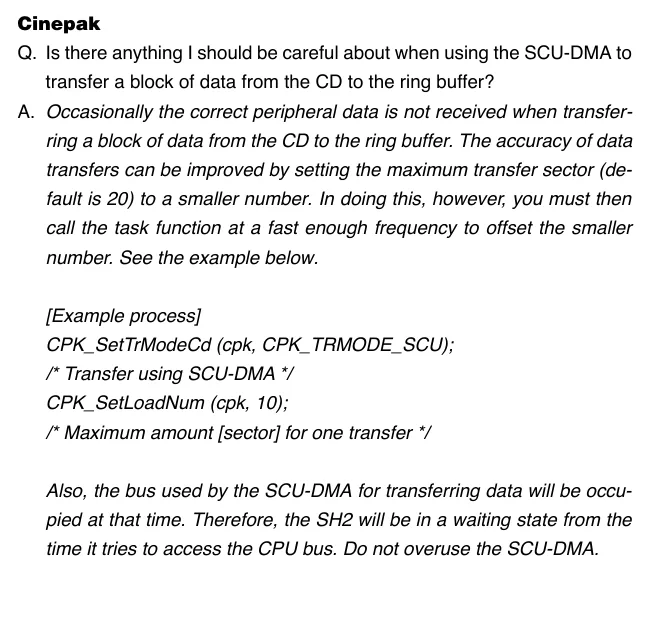
Cinepak troubleshooting answer cropped from DevelopMental, November 1996, PDF p. 5. It describes an observed SDK transfer issue, not a rule for every game’s CPK files.
Branching video streams
The Branching Playback Library (BPL) is not another video codec. Sega designed it to read from a chosen CD data stream without an obvious pause when a player choice changes the next scene. The application supplies possible destinations; BPL opens and pre-reads candidate streams into the CD buffer, selects the destination, and tells the application which stream comes next. A decoder such as MPEG or Cinepak then turns that stream into picture and sound 4.

Flow reconstructed from the Branching Playback Library manual.
For someone investigating an interactive FMV title, that distinction matters: stream layout and branch timing may be as important as the video file’s codec. The BPL manual documents the library calls and scenario data 4. It describes a developer facility, not proof that a particular retail game used BPL.
How the stream library selected sectors
Sega’s earlier Stream System specification describes the layer beneath a video decoder. Audio, video, and other data could be interleaved on the disc rather than stored as uninterrupted files. A stream group kept related streams together for synchronized access. The library selected CD-ROM XA Mode 2 sectors by file number, channel number, submode, and coding information in their subheaders 5.
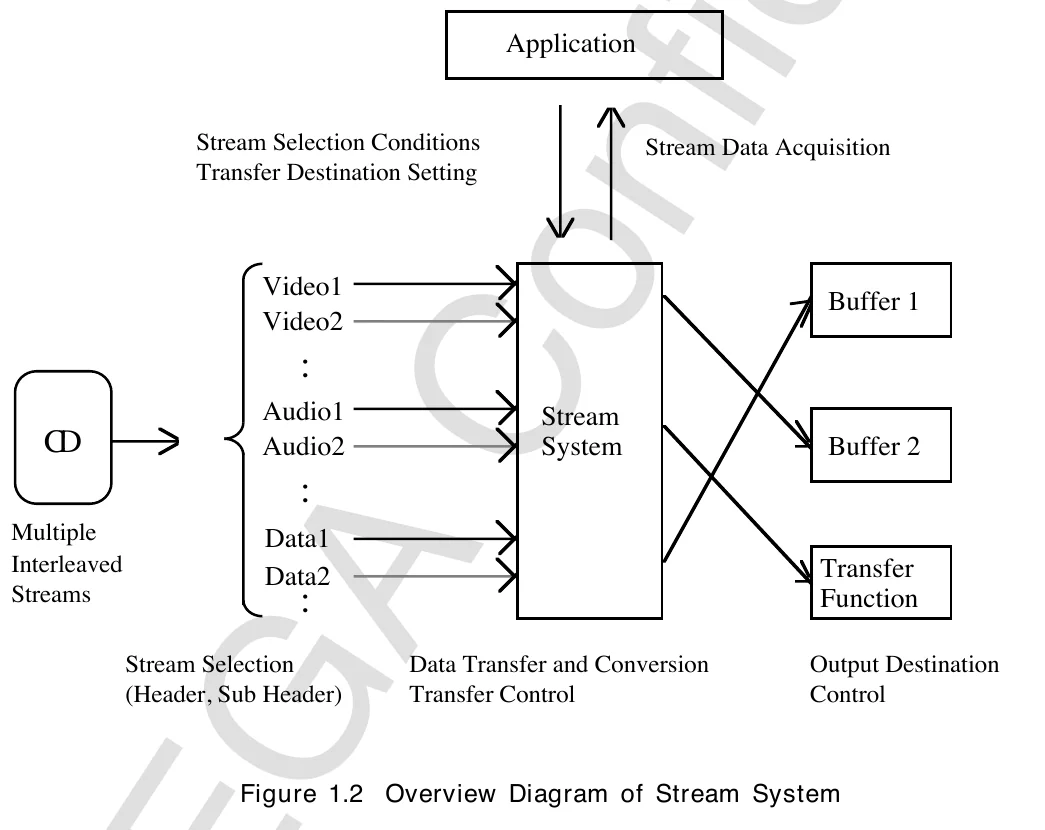
Diagram cropped from Sega’s Stream System specification, PDF p. 7. It describes an SDK facility; an individual game’s disc layout still needs to be inspected.
The application could direct a selected stream to a CPU buffer or a processing function. Closing the transfer gate let data accumulate in the CD buffer; a resident stream could remain there for later reuse without another disc read 5. These are useful clues when a recovered executable appears to filter sectors or manage buffers instead of simply opening and reading a file.
MPEG stream sector budget
Sega’s Virtual CD supplement treats an MPEG stream as a disc-layout calculation. A CD-ROM XA sector does not have the same usable payload for every kind of stream: MPEG video gets 2,296 bytes, MPEG audio 2,279, Form 1 data 2,048, and Form 2 data 2,324 6. The disc builder needs enough sectors each second for the sum of the component bitrates after accounting for those different payload sizes.
For example, 800 kbit/s of MPEG video plus 224 kbit/s of MPEG audio requires about 56 sectors per second by Sega’s formula. Reserving 75 would leave roughly 19 sectors per second as padding in this simplified example. Sega’s follow-up warns that excess empty sectors make the file larger and undermine pre-reading into the CD buffer; it recommends the smallest sector rate that still holds the stream 6 7. This is an authoring constraint, not a way to identify MPEG solely from a filename.
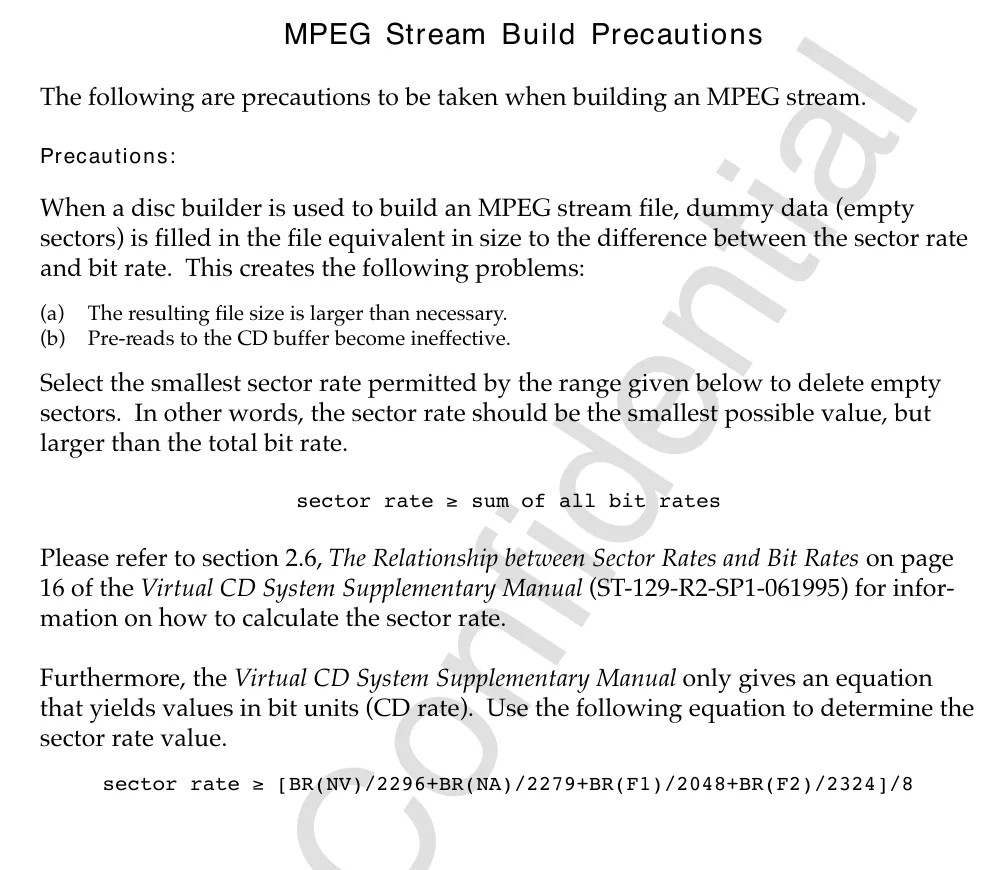
Sector-rate guidance cropped from Sega’s MPEG Stream Build Precautions, PDF p. 4. The worked bitrate example in the article applies this published formula.
AVI - Audio Video Interleave
The Sega Saturn had support for Audio Video Interleave (AVI) video files and was widley used in games such as Devil Summoner. You will notice that these files start with the magic header RIFF, this is due to AVI being a subformat based on the Resource Interchange File Format (RIFF) 8.
TGQ - Video Files
Electronic Arts TGQ - MultimediaWiki
Image formats
SEGA2D scroll data
The Saturn/32X graphics reference calls SEGA2D Sega’s standard Saturn scroll-data format. It starts with a 0x100-byte header. The first 16 bytes contain SEGA 32BIT2DSCR followed by 0x1A; the remaining fields point to map, page, character-generator, palette, and attribute data 9. Unlike a fixed sequence of pixel blocks, the sections can move: each has its own offset and size pair.
The first useful pairs are:
| Section | Offset field | Size field |
|---|---|---|
| Map | 0x10 |
0x14 |
| Page | 0x20 |
0x24 |
| Character generator | 0x30 |
0x34 |
| Palette | 0x40 |
0x44 |
| Attributes | 0x50 |
0x54 |
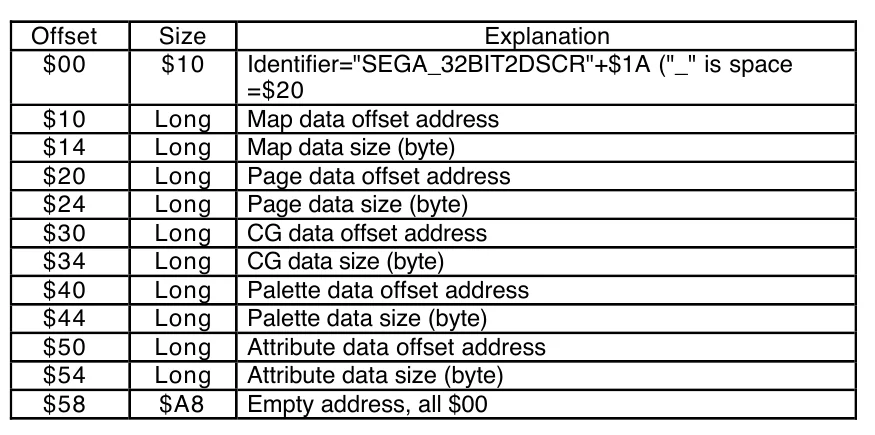
Header table cropped from Saturn/32X Graphic References, PDF p. 6. Use the offsets to find the sections before interpreting their tile and palette contents.
The manual goes on to define page pattern names, palette choices, flip flags, and character sizes. It is a specification for Sega’s tool format, not a promise that every retail game kept its backgrounds as SEGA2D files 9.
SEGA3D model text
The same reference describes SEGA3D as a text format beginning with SEGA 3D, followed by model, material, slip, and object sections. A model lists vertices and normals, then polygons as vertex indices. The polygon entry has four indices: a triangle repeats its third vertex in the fourth position. The manual also says surface vertices are numbered clockwise 9. Those details offer quick checks when a recovered model looks inside-out or a parser treats a triangle as a malformed quad.
Material entries can name a texture and combine flags for flat colour, texture mapping, Gouraud shading, mesh, transparency, shadow, and wireframe. The file is an interchange or authoring format; a game’s runtime geometry may have been converted into a different layout 9.
SIFF scene interchange files
Sega and several vendors developed SIFF 1.0 (Scene Interchange File Format) to exchange 3D scene, model, and animation data between graphics tools. This is an interchange specification, not a claim that retail Saturn games store assets in SIFF. Its October 1996 specification describes an Electronic Arts IFF FORM whose type is SF1Q; fields are big-endian, and chunks are padded to 32-bit boundaries 10.
The format gives objects named parent relationships, transformation matrices, geometry, and visual data. Its coordinates put positive X to the right, positive Y downward, and positive Z into the screen; UV coordinates run from the top-left of a texture. These conventions matter when interpreting a converter or writing a parser. The original SIFF specification provides the complete chunk definitions.
The specification sketches the outer wrapper before defining any individual scene chunk. A parser first sees FORM, the group size, and SF1Q; only then can it walk the chunk definitions 10.
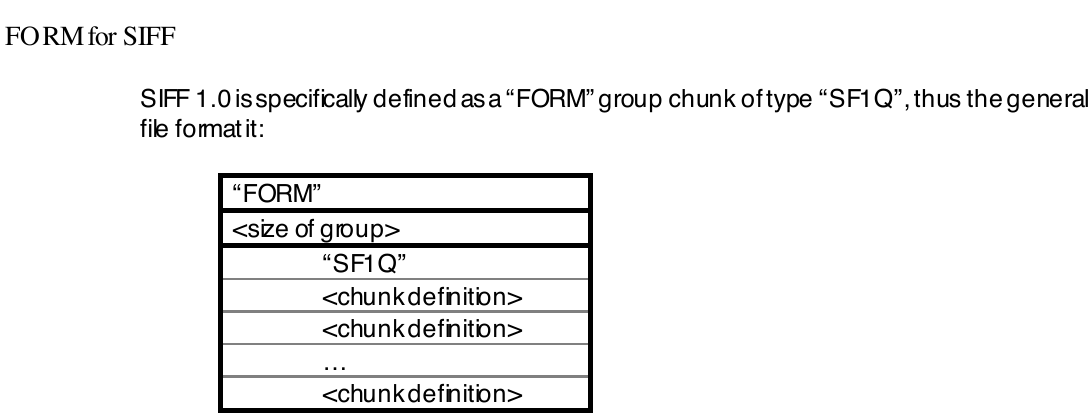
Diagram cropped from the SIFF 1.0 specification, PDF p. 2. It describes an interchange file, not a retail game’s asset format.
RGB Files
doyousketch2/SatRGB: Extract RGB images from Sega Saturn files
SDK bitmap fonts (.FON)
Sega’s Sample Data User’s Manual describes ASCII.FON and KANA.FON as 8-by-16, one-byte-code fonts and KANJI.FON as a 16-by-16, two-byte-code font 11. In the first pair, one byte represents each horizontal row of an eight-pixel glyph. The kanji layout uses two bytes per row, left byte first, giving 32 bytes for a 16-row glyph.
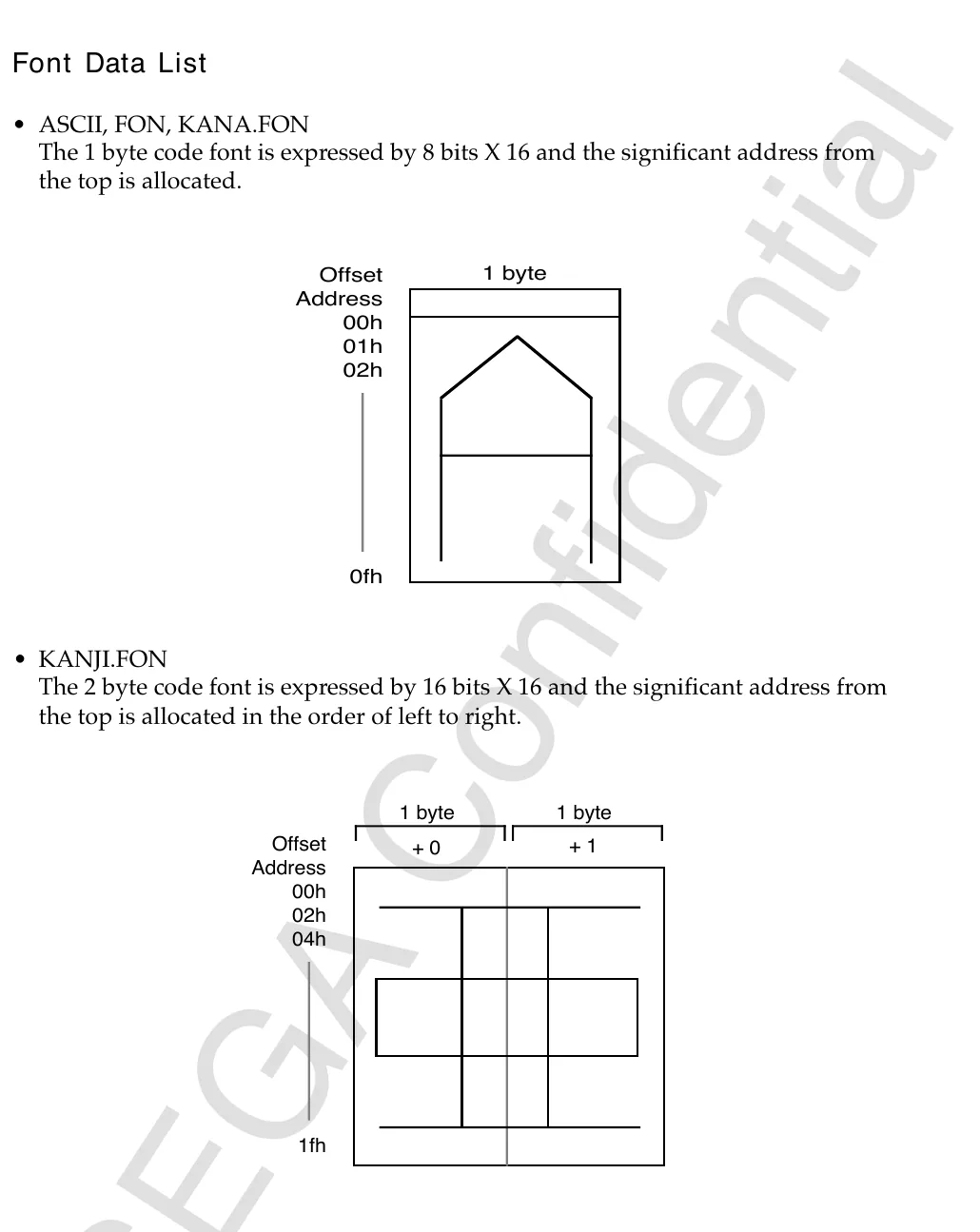
Font-byte diagrams cropped from the Sample Data User’s Manual, PDF p. 9. They document Sega’s supplied sample fonts, not a universal font format in retail games.
The row widths provide a useful first check when a candidate .FON asset looks like noise: 16 bytes per 8-by-16 glyph or 32 bytes per 16-by-16 glyph, before any game’s own indexing or packaging is considered 11.
Audio Formats
SEQ files
mistydemeo/seq2mid: Tool and documentation for the Sega Saturn SEQ format
Sega’s Standard MIDI File: Saturn Converter Specification describes the converter’s output rather than a generic MIDI file renamed to .SEQ. Its header begins with a two-byte resolution, a one-byte track count, a one-byte flag field, a two-byte tune length, then offsets to the tempo track and each regular track. The event stream includes notes, rests, loops, program changes, pressure, and pitch bend 12. That makes the first bytes a useful sanity check before feeding an unknown file to a converter or parser.
The first fields in Sega’s output layout are:
| Offset | Size | Meaning |
|---|---|---|
0x00 |
2 bytes | Resolution |
0x02 |
1 byte | Number of tracks |
0x03 |
1 byte | Header flags |
0x04 |
2 bytes | Tune length |
0x06 |
2 bytes | Reserved |
0x08 |
2 bytes | Tempo-track offset |
0x0A onward |
2 bytes each | Regular-track offsets |
SCSP and SCSPBIN tone data
The Tone Editor addendum distinguishes its Macintosh SCSP document from SCSPBIN, the form containing data transferred to the Saturn’s 68000 sound memory and Macintosh resource information. An SCSP file starts with the four ASCII bytes SCSP, a four-byte size, and a VOCE chunk marker before its mixer and voice data. The addendum then documents the offset-based SCSPBIN layout for mixer, velocity, and envelope data 13. These are sound-tool interchange and transfer formats; the exact bytes in a retail game’s proprietary sound archive still need to be checked independently.
AIF files
Audio Formats in Saturn Games - Mini-Revver
Other Formats
PCS
A quick look at the PCS File format from the Sega Saturn game Exhumed/Powerslave:
MDT and MDP
MDT and MDP File Formats · TrekkiesUnite118/GrandiaTranslation Wiki
PRS Files
Grandia
DSK
Virtual Disc image used by developers when using the Mirage CD Emulator.
References
-
Sega, Disc Format Standards Specification Sheet, section 4, especially
IP SIZEandIP Placement. ↩ -
Sega DTS, DevelopMental, November 1996, PDF p. 5, Cinepak and SCU DMA Q&A. ↩
-
Sega, Branching Playback Library User’s Manual, August 1995, overview and branching functions. ↩ ↩2
-
Sega, External Specification Document: Saturn Stream System, sections 1 and 4 on sector selection, stream groups, transfer gates, and resident streams. ↩ ↩2
-
Sega, Virtual CD System Supplementary Manual, section 2.6, PDF p. 19, sector payload sizes and bit-rate relationship. ↩ ↩2
-
Sega, MPEG Stream Build Precautions, PDF p. 4, padding and sector-rate recommendation. ↩
-
Sega, Saturn/32X Graphic References, sections 1 and 4 on SEGA2D and SEGA3D layouts. ↩ ↩2 ↩3 ↩4
-
Sega and vendors, SIFF 1.0 Scene Interchange File Format, October 1996,
FORM for SIFFandSIFF General Notes. ↩ ↩2 -
Sega, Sample Data User’s Manual, PDF pp. 7-9, font names, dimensions, and row layouts. ↩ ↩2
-
Sega, Standard MIDI File: Saturn Converter Specification, “Structure of Output Files” and event descriptions. ↩
-
Sega, Tone Editor User’s Manual Addendum: File Formats,
SCSPandSCSPBINformat sections. ↩