

AI Assisted PS1 Decompilation Tutorial
Start with your own PlayStation disc image in decompdecomp. Let its local tools find free matches, then connect a coding agent for the harder functions. This tutorial uses Chicken Run on the Sony PlayStation.
The goal is matching decompilation: recovering C that compiles to the original machine-code bytes. Your first milestone is a saved, verified function match. A finished PC port requires further work.
Get the App and Your Disc Ready
Install decompdecomp, then open the app. The RetroReversing fork adds macOS support to n-delic’s upstream project. We intend to submit useful changes back upstream; check each repository’s installation instructions when choosing a version.
Keep your own disc dump and its companion files together in a permanent folder. The app can read supported BIN, ISO and CHD disc images, or an extracted PS-X EXE program. Starting with the disc gives it access to additional code files as well as the boot program 1.
PS1 support is marked beta. The app’s PS1 demo rebuilds, but its platform definition does not claim a complete byte-for-byte retail-game rebuild. Treat import success, individual matches and a complete rebuild as separate milestones 2.
Import Chicken Run
Choose New project, then select your game file. Our example uses Chicken Run (Europe) (Fr,De,It,Es).bin. Confirm that it is your own copy and select Start decompiling.
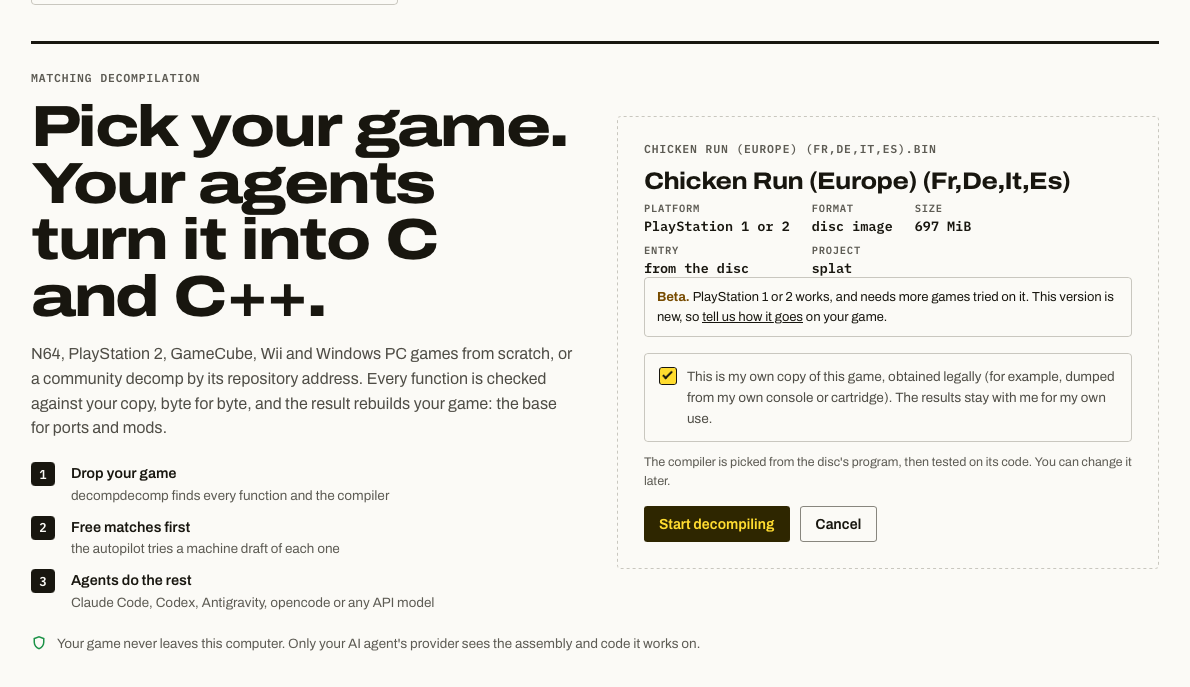
Our selected image is the European French, German, Italian and Spanish release. The 697 MiB shown is the disc image size, not the amount of executable code to recover. This screenshot records the import stage, before matching results.
What the Import Screen Means
The screen describes the input, rather than promising a decompilation result:
| Field | Meaning |
|---|---|
| Platform | The initial screen groups PlayStation 1 and 2 inputs. The importer examines the disc’s boot configuration and program format to distinguish them. |
| Format | Disc image. The app reads its filesystem to find the program; it does not treat the entire BIN as executable code. |
| Entry | “From the disc” means the program’s entry point will be obtained during import. |
| Project | splat is the project layout used to split the program into code and data for reconstruction. |
| Compiler | The app tests compiler candidates against extracted code. A filename or release year alone cannot establish the original compiler. |
The PS1 importer reads the BOOT entry in SYSTEM.CNF, then loads the named PS-X EXE. It can also follow recognised loader references to another executable and look for additional code regions, called overlays. These are heuristics: custom archives or compressed code may require further investigation 1.
If you want to understand the file the app extracts, our executable guide explains its header and memory addresses:
Collect Free Matches First
Let the automatic pass finish before starting agents. Local tools draft C and compile it against the original bytes. This stage uses computer time but no AI model tokens. Setup may download the required tools 3.
When it finishes, note the matched-function count and code coverage, then save or export a checkpoint. These are different measurements: ten tiny functions can represent less code than one large function.
Keep the free-pass result separate from agent progress. The later screenshot below was taken with two agents already working, so its match count is not a measurement of the free pass alone. We have not recorded a final coverage figure or agent cost for Chicken Run.
Understand the PS1 Compiler
The compiler converts recovered C into machine instructions. Matching needs the right compiler version, flags and assembler behaviour. Plausible C can behave correctly while producing different bytes.
The app offers these PS1 compiler candidates. The usage descriptions are its starting guidance, not proof about a particular game 2:
| Compiler | App identifier | Typical use in the app’s guidance |
|---|---|---|
| GCC 2.6.3 | gcc-2.6.3-psx |
PSY-Q 3.5-3.6; early PlayStation games, 1995-1996 |
| GCC 2.7.2 | gcc-2.7.2-psx |
PSY-Q 4.0-4.3; many PlayStation games, 1996-1998 |
| GCC 2.8.1 | gcc-2.8.1-psx |
PSY-Q 4.4; some later PlayStation games |
Let matching evidence choose Chicken Run’s settings. A PS-X EXE does not identify its exact PSY-Q version. Unless you choose a compiler explicitly, the app tests its supported GCC versions after import 2.
Compiler Coverage Is Incomplete
decompdecomp does not include every compiler used for retail PS1 games. Its three PS1 candidates cover part of the GCC family. A game built with another version or compiler family may need additional toolchain support before its C can match. Spending more on an AI model cannot correct a missing compiler.
Published matching projects document these additional compiler requirements. These are evidence from particular games and build configurations, rather than a complete catalogue of PS1 toolchains:
| Missing compiler or variant | Retail-game matching evidence |
|---|---|
| GCC 2.5.7 | The Rayman decompilation explicitly requires this version 4. |
| GCC 2.6.0, GCC 2.8.0 and GCC 2.7.2 CDK | Legend of Mana uses these variants for different parts of its matching build. The CDK variant is distinct from the app’s existing GCC 2.7.2 PSX entry 5. |
| EGCS 2.91.66 / EGCS 1.1.2 | The Vib-Ribbon project uses this compiler with a documented adjustment to its C++ compiler 6. |
| GCC 2.95.2, PSY-Q build | The Yu-Gi-Oh! Forbidden Memories project identifies the PSY-Q 4.6 compiler and ASPSX 2.86 7. |
| Metrowerks CodeWarrior for PlayStation Release 4 | The Digimon World decompilation requires its cc_mips.dll. This is a different compiler family from GCC 8. |
| Early SGI IDO/RISCompiler-derived PS1 toolchain | The Tokimeki Memorial project uses IDO 5.3 with compatibility steps to reproduce an early SGI-family compiler. decompdecomp has N64 IDO support, but no corresponding PS1 integration 9. |
PSY-Q 4.4 is not a catch-all for later SDKs. Preserved compiler banners identify GCC 2.8.1 in PSY-Q 4.4, EGCS 2.91.66 in 4.5, and GCC 2.95.2 in 4.6. Matching also depends on the corresponding assembler behaviour, not just the GCC version number 10.
If the supported compilers consistently fail on plausible C, check the game’s existing reverse-engineering research and toolchain evidence before increasing model cost. A compiler that runs successfully still needs matching-output validation for the game.
Why the Assembler Matters Too
PSY-Q used Sony’s ASPSX assembler after GCC. The app uses maspsx to reproduce its behaviours before GNU assembly, including load-delay handling and division checks. This is why selecting an arbitrary modern MIPS GCC is insufficient 2.
Options such as -O2 affect optimization. -G8 controls which small globals can use the $gp register for addressing; the app chooses an initial small-data setting from the imported program. Workers can test alternatives when a promising C candidate will not match 2.
On Apple Silicon Macs, our compiler support fix enables native GCC 2.7.2 and 2.8.1 builds and runs maspsx with the app’s bundled Python. The GCC 2.6.3 support change adds a build from pinned source using Xcode Command Line Tools. That build also supports Intel Macs, although our local compiler check was on Apple Silicon. If the app says a compiler has no build for this computer, check whether your installed version includes the relevant change.
Use Compilers & tools to check tool availability. Review proposed compiler changes in the project rather than assuming that one setting must suit every code region. For background on the original development environment, see our PSY-Q SDK guide and setup article.
Start a Coding Agent
Get an agent. Install and sign in to Codex CLI or Claude Code. In decompdecomp, open Agents & models and check that your agent is available. Alternatively, configure an API provider there.
Start small. Return to Chicken Run, select Start agents, choose Decompile, and select your agent and model. Begin with one worker and the default eight functions per session 11.
Try a cheap model first. Luna or Haiku can be a starting choice for easier remaining functions. Watch actual matches and usage. When the app reports poor results and suggests moving up, try a stronger model in the same project so it can reuse saved attempts. This is a cost-control strategy, not a measured PS1 model ranking.
Watch the verification loop. The worker receives assembly and project context, writes candidate C, and asks the app to compile it. Differences guide another attempt. A verified match is saved; unsupported or difficult work can be released for another worker.
Chicken Run With Agents Running
Our next screenshot shows 76 matched functions, 0.66% of code and 1,060 compiles, with two agents working. The project is using GCC 2.7.2 (PSY-Q 4.0-4.3). The selected compiler is a working configuration, not proof that every part of the game used that version.
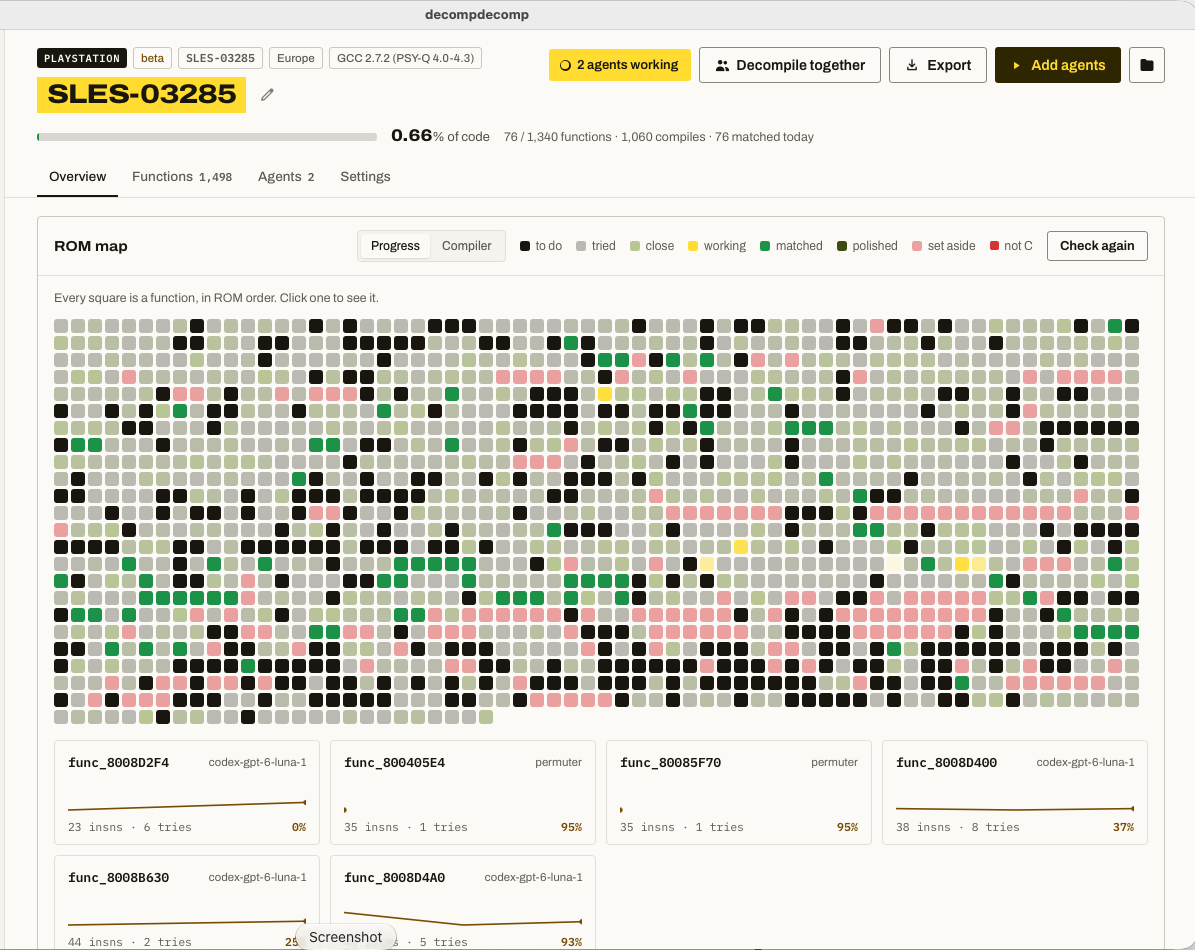
This is an in-progress snapshot with two active agents, not the free-pass baseline. The header reports 76 of 1,340 functions matched; the Functions tab separately lists 1,498 entries. Coverage measures code bytes, so it differs from the share of functions matched.
The cards beneath the map show work in progress, including Luna workers and the local permuter. A card at 95% is still an unmatched candidate; it does not contribute a verified match until the byte comparison succeeds.
What the Two Session Controls Change
These controls affect concurrency and conversation size, rather than guaranteeing matches:
| Control | Practical effect |
|---|---|
| How many | Parallel workers. More workers consume allowance and CPU simultaneously. Start with one. |
| Functions per session | How many compiled claims a worker attempts before starting a fresh conversation. A claim may contain several small functions, and an unsuccessful compiled attempt can count. |
| Lower session size | More frequent context resets, with more repeated setup overhead. |
| Higher session size | More recent reasoning carried forward, but potentially larger conversations and greater token use. |
Eight functions per session does not mean eight new matches, or that work stops after eight attempts. The app starts further sessions while work remains 11.
Keep Costs Visible
A subscription-backed CLI can use your included allowance; an API key consumes separately billed usage. Local compiler checks are free of model charges, but asking the agent to interpret each result still uses tokens.
Our provider setup instructions and recorded costs are collected in the companion tutorial. Its game benchmarks are labelled by game and checkpoint; do not read them as PS1 performance predictions:

Read the Function Map
Each square represents a detected function. These colours follow the app’s status palette 12:
| Status | What to look for |
|---|---|
| To do | No scored candidate or active claim. It may still have failed compilations or inspection notes. |
| Tried | A candidate was scored but did not match. The best attempt is retained. |
| Close | The candidate has a relatively good difference score. The colour is a gradient, not a guarantee of an easy finish. |
| Working | A worker currently holds the function’s claim. |
| Matched | C compiles to the target bytes under the project’s comparison settings. |
| Polished | Matched code has also received clearer names, types or comments without losing its match. |
| Set aside | Excluded from ordinary matching work, for example because it appears to be assembly. |
| Not C | Multiple models assessed it as unsuitable for their C matching workflow. This assessment can be revisited. |
The queue does not follow map order. It generally favours smaller functions and useful duplicate matches, while accounting for dependencies, recent failures and model results. Open a square to inspect its history rather than assuming that every dark square is untouched 12.
PS1 Obstacles Worth Recognising
Overlays are separate code regions. Games can load different code into the same RAM addresses at different times. If a function appears missing or its calls make no sense, check which region is loaded. A match percentage describes the code the project has identified; it does not prove every executable region on the disc was found 1.
Some code started as assembly. PS1 geometry routines can use the GTE, the console’s geometry coprocessor. GTE macros and BIOS call stubs may be set aside rather than forced into ordinary C. That is a reason to inspect the classification, not automatically change models 2.
A match is not a complete port. Recovered function names and comments still need review. Export a checkpoint and inspect its build instructions; validate the program and any overlays included in that export before claiming a complete reconstruction. A playable native port also needs platform and asset work.
For the next Chicken Run checkpoint, record the exact disc edition, detected compiler, free-pass totals, model and effort, elapsed time, and actual spending or subscription usage. That will let us compare agent progress against a clear starting point.
References
-
decompdecomp’s PS1 executable and disc reader, PS1 import implementation, and shared disc reader. The Chicken Run edition and import-screen details are from the supplied screenshot. ↩ ↩2 ↩3
-
decompdecomp’s PS1 platform definition and PS1 matching guide, compiler choices, beta status, assembler behaviour, small data, GTE and BIOS stubs. Inspected 25 October 2026. ↩ ↩2 ↩3 ↩4 ↩5 ↩6
-
decompdecomp README, installation, automatic matching, tools and project export. ↩
-
Rayman PS1 decompilation build instructions, GCC 2.5.7 requirement. ↩
-
Legend of Mana toolchain table, historical GCC variants and per-region compilation pipelines. ↩
-
Vib-Ribbon matching project, EGCS 2.91.66 and its C++ compiler adjustment. ↩
-
Yu-Gi-Oh! Forbidden Memories toolchain, PSY-Q GCC 2.95.2 and ASPSX 2.86. ↩
-
Digimon World build instructions, CodeWarrior for PlayStation Release 4 and
cc_mips.dll. ↩ -
Tokimeki Memorial toolchain explanation, early SGI-family code generation reproduced with IDO 5.3 and compatibility steps. The absence of a PS1 IDO option was checked against decompdecomp’s PS1 platform definition on 25 October 2026. ↩
-
mkst’s preserved PSY-Q compiler version information, compiler banners and ASPSX versions for PSY-Q 4.4, 4.5 and 4.6. ↩
-
decompdecomp’s agent session manager and worker tools and prompts, sessions, compiled claims and worker lifecycle. ↩ ↩2
-
decompdecomp’s function-map logic and claim scheduler, status colours and function selection. ↩ ↩2